Here's a scenario that plays out on nearly every large data migration project.
You're a few weeks into the mapping phase. An analyst is working through the source columns for the HR legacy system and hits a field called EMP_PRM_TYP_CD. No description. No data dictionary. The person who wrote the original system retired eight years ago. The profiling results show a handful of short alpha codes — "A", "B", "C", "P", "T" — with no obvious meaning.
So the analyst does what analysts do under time pressure: they make their best guess, write something vague in the description field ("Employee type code"), and move on.
That vague description follows the column through the entire project. It informs the mapping decision. It ends up in the job specification handed to the ETL developer. It shapes how the QA team tests the result. Eventually, in UAT, a business user looks at the migrated data and flags it — "P" didn't mean what the analyst assumed. The mapping was wrong. The fix requires rework across three downstream tables.
This is not a rare edge case. It's a pattern. And it starts with a bad description.
Descriptions Are the Shared Language of a Migration Project
On a data migration project, every decision flows from an understanding of the data. What does this field hold? What are the valid values? What does it mean to the business? How does it relate to other fields in the same system?
The answers to those questions — captured as descriptions — are the foundation that everything else is built on. Mapping decisions depend on them. Transformation rules reference them. ETL job specifications include them. QA test cases are written against them. UAT participants use them to evaluate whether the migrated data makes sense.
When descriptions are accurate and complete, the whole team operates from the same understanding. Business analysts, technical developers, QA testers, and business users are all working from the same shared language. Misunderstandings get caught early, at the source, before they ripple through downstream work.
When descriptions are wrong, vague, or missing — the misunderstandings don't disappear. They just move underground, invisible until something breaks.
Legacy Systems Almost Never Have Good Descriptions
The problem is that descriptions are almost universally inadequate on legacy systems — and for understandable reasons.
Legacy systems, by definition, are old. Many were built in an era when database documentation wasn't a priority, or when the developers who understood the system intimately were expected to stay forever. The original data dictionary, if it ever existed, has long since fallen out of date. Columns have been repurposed. Fields that once held one thing now hold something else. Naming conventions from a 1990s development methodology — CUST_PRM_FLG, ACCT_STAT_CD, EMP_TERM_DT_2 — tell you almost nothing about business meaning.
Tribal knowledge fills the gap — but tribal knowledge walks out the door. When the person who actually knows what EMP_PRM_TYP_CD means leaves the organization, that understanding goes with them. What remains is a column name that's technically accurate and practically useless.
The migration team is left to reconstruct meaning from whatever clues are available: the column name itself, the data type, the profiling results, the values in the field, the context of surrounding columns, and whatever fragments of institutional knowledge can be assembled from interviews and old documents. It's detective work. It's slow. And it introduces uncertainty that compounds throughout the project.
The Scale Problem Makes Manual Documentation Impractical
Even when teams recognize the importance of good descriptions, the scale of the problem defeats them.
A typical large migration project involves hundreds of source tables and thousands of columns. Writing a meaningful, accurate description for each one — even if it only takes three minutes per column — adds up to weeks of analyst time. On most projects, that time simply isn't budgeted. Descriptions become a nice-to-have that gets squeezed out by the demands of mapping, testing, and stakeholder management.
The result is predictable. Descriptions get written quickly and poorly under time pressure. Obvious columns get reasonable descriptions; ambiguous columns get vague ones. Team members copy descriptions from similar columns without verifying they're accurate. Quality degrades as fatigue sets in. By the end of the cataloging phase, a third of the columns have no description at all, another third have descriptions that are technically accurate but not useful, and the rest are adequate.
This isn't a failure of diligence. It's a capacity problem. The volume of work is simply too large for sustained manual effort to handle well.
How dmPro Generates Descriptions
dmPro's AI description generation was built specifically to solve this problem — not as a generic feature, but as a targeted response to one of the most consistent pain points in migration project setup.
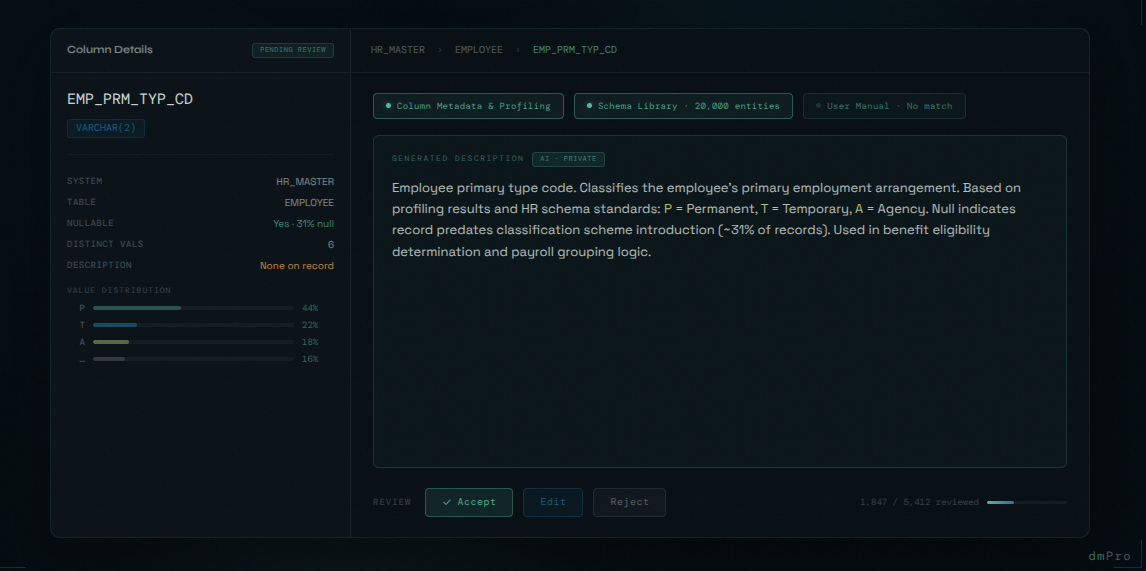
What makes it effective is the range of sources the AI draws on simultaneously. Most tools can guess at a column's meaning from its name alone. dmPro's AI works with three distinct inputs at once.
Column Metadata and Profiling Results
The AI uses everything dmPro already knows about the column: name, data type, business area assignment, classification, and data profiling results — value distributions, null rates, pattern frequencies, unique value counts. This grounds the description in the actual behavior of the data, not just what the column name suggests.
Consider a column named EMP_TERM_DT with a DATE type, values spanning 1990 to the present, and a null rate of 72%. A description based on name alone might say "Employee termination date." With profiling context, it becomes: "Employee termination date. Records the date the employee's employment was terminated. Null indicates the employee is currently active. Populated for approximately 28% of records." The ETL developer knows to handle nulls explicitly. The QA tester knows what the expected distribution looks like. The business user in UAT understands what they're looking at.
A Library of 20,000 Industry-Standard Entities
Many legacy systems, whatever their naming conventions, implement concepts that are well-defined in industry-standard and open source schemas — HR frameworks, financial data models, healthcare standards, government data specifications. dmPro includes a curated library of over 20,000 entities drawn from these authoritative sources, each with a vetted description.
When a column maps to a known entity in the library, the AI can anchor its description to that authoritative definition rather than inferring from scratch. This is particularly valuable for regulated industries where precise, standards-aligned definitions matter — and where an AI-generated description that happens to diverge from the regulatory definition creates downstream risk. The library gives the AI a foundation of verified meaning that no amount of metadata analysis alone can provide.
Your Own System Documentation
The people who built the legacy system often did document it — in user manuals, functional specifications, data dictionaries, and technical guides. That documentation exists somewhere. It just isn't connected to the migration project in any useful way.
dmPro allows teams to upload existing system documentation directly. The AI performs semantic search across those documents when generating descriptions, surfacing relevant passages and definitions that were written by the people who knew the system best. If your legacy HR system has a 200-page user manual that explains exactly what EMP_PRM_TYP_CD means, that knowledge doesn't have to be reconstructed by an analyst — it can be found and applied automatically.
This runs on a private AI, so uploaded documentation stays within your environment. For government and enterprise organizations handling sensitive system documentation, that's not a nice-to-have — it's a requirement.
This transforms documentation that would otherwise sit unread in a SharePoint folder into active context that improves description quality across the entire project.
All Three Together
The power of the approach is that these inputs reinforce each other. The AI isn't choosing one source over another — it's synthesizing all available evidence to produce the most accurate and complete description it can. A column matched to an industry-standard entity, with profiling results that confirm the expected value patterns, and a relevant passage from the uploaded user manual, gets a description that a human analyst would struggle to match even with unlimited time.
For columns where the evidence is thin — cryptic names, no profiling, no documentation match, no library match — the AI generates the best available description and flags it for human review. These are the columns that genuinely need analyst attention. Everything else is handled.
Every Recommendation Goes Through Human Review
No AI-generated description is committed without human sign-off. Every recommendation from the AI enters a built-in review workflow in dmPro, where an analyst can accept it, reject it, or edit it before it becomes part of the project record.
This isn't just a safeguard — it's a fundamentally different way of working. The analyst's role shifts from generation to review. Reading a generated description, checking it against their knowledge of the system, and accepting it or making a quick edit takes seconds. Writing from scratch takes minutes. Across thousands of columns, that difference is measured in weeks.
The workflow also creates an audit trail. Every description in dmPro has a record of whether it was AI-generated, whether it was reviewed, who reviewed it, and what changes were made. For regulated industries where traceability matters, that's not a minor detail — it's evidence that the cataloguing process was conducted with human oversight at every step.
The obvious columns flow through quickly. The ambiguous ones get the focused attention they deserve. And the team has full confidence in the quality of what's in the system, because nothing was accepted without someone looking at it.
AI doesn't get fatigued. It doesn't start writing lazily at column 800 because it's trying to finish before the end of the day. It applies the same analysis to the 4,000th column as it does to the first. And when its output is wrong, the human reviewer catches it in the workflow — which is far more efficient than generating everything from scratch.
Descriptions as Risk Reduction
It's worth being direct about the risk dimension here, because descriptions can feel like a documentation nicety rather than a risk factor.
The consequences of poor descriptions compound through the project. A bad description leads to a questionable mapping. A questionable mapping leads to an ambiguous job specification. An ambiguous job spec leads to an ETL developer making assumptions. Those assumptions surface as data quality failures in testing. The failures require rework — rework that is far more expensive than getting the description right in the first place.
Every migration project has a cost multiplier for defects found late. Issues caught during initial cataloguing are essentially free to fix. Issues caught in UAT are 10-20x more expensive. Issues that make it to production can be catastrophic.
Good descriptions don't eliminate all of these issues. But they reduce the number of misunderstandings at the source, before they can compound. When every team member is operating from accurate, complete descriptions, the rate of downstream assumptions and errors drops significantly.
This is the kind of risk reduction that doesn't show up in a status report — it shows up in a project that hits its go-live date.
What Comes Next
There's a reason we've spent this much time on descriptions. They aren't just documentation — they're the direct input into the next critical step: mapping source columns to target columns.
Every mapping decision is a judgment call about meaning. What does this source field represent? Which target field captures the same concept? What transformation is needed to reconcile the two? Those questions can only be answered accurately if the team has a clear, shared understanding of what each column means.
Which is exactly why dmPro's AI doesn't stop at descriptions. In the next post, we'll look at how dmPro uses all of that same context — the descriptions, the profiling data, the industry schema library, the uploaded documentation — to suggest source-to-target mappings automatically, and what that means for the speed and accuracy of the mapping phase.