The analyst sends an email on Friday afternoon: "Mapping for the CONTRACTS table is done. Developer should be good to go."
The developer is deep in something else. The email sits unread until Monday. By Monday, the analyst has moved on to three other tables and isn't sure if the original QA sign-off is still current. The developer asks for confirmation. The analyst checks again. By Tuesday, the developer finally has what they need — four days after the mapping was actually finished.
Multiply that pattern by 40 tables, three system integrations, and a project timeline measured in months. The work between "mapping is done" and "ETL job runs" isn't a technical problem. It's a coordination problem. And coordination problems don't get solved by working faster — they get solved by making information visible to everyone who needs it, automatically.
The Gap Nobody Plans For
Every data migration project has a handoff moment: the point when analytical work (field mapping, data profiling, QA review) concludes and technical work (ETL job construction, execution, validation) begins. Project plans account for both sides of that moment. What they rarely account for is the gap in between.
In practice, that gap is filled with status check-ins — developers asking analysts "is it ready yet?" and analysts who aren't sure which developer is waiting for which table. The information exists. It's just scattered across spreadsheets, email threads, and Slack channels that not everyone has access to, and it goes stale the moment something changes.
The problem compounds in both directions. Developers can't make efficient use of their time if they don't know which tables are ready. Analysts can't prioritize their remaining mapping work if they don't know which tables are blocking someone. The project runs slower not because people are working slowly, but because coordination friction is eating the schedule.
Pre-Creating Jobs Before Mapping Is Complete
dmPro addresses this by treating migration jobs as first-class objects in the tool — not as an afterthought that appears after mapping is finished.
Developers can create migration job records in dmPro before mapping is even complete. They define the job, configure the source extract query using the visual structured query builder, and set the job up — then wait. The structured query builder lets developers build precise extract logic visually, without writing SQL, with a live preview of what the query will return. The job is ready to run the moment the data it depends on is confirmed.
This isn't just a workflow convenience. It changes the architecture of how the project tracks progress. Once a job record exists in dmPro, it can be associated with the mapping work it depends on. The system knows what the job needs. When those dependencies are met, the system knows the job is ready.
That relationship — between a migration job and the mapping decisions that drive it — is what makes automated coordination possible.
Readiness Is Visible Without Asking
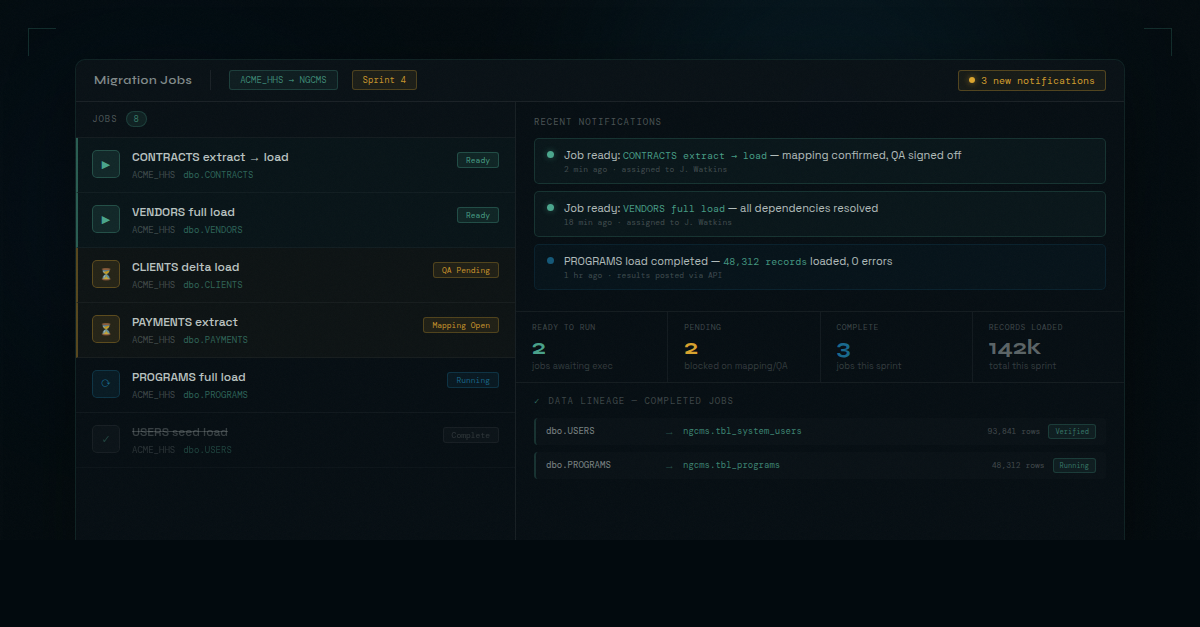
When a developer creates a job in dmPro and links it to the relevant tables, the question "is it ready yet?" becomes something the developer can answer by looking at the migration job list rather than sending an email.
The migration job list shows the readiness status of every job at a glance. For jobs that aren't ready, a detailed readiness page — accessible directly from the job view — breaks down exactly what's outstanding: which mapping decisions are still pending, which questions remain unanswered, which sign-offs haven't been given. Mapping status, QA sign-off, open questions — all of it is visible in one place without anyone having to compile a status report.
The single most expensive thing in a data migration project is waiting for information that already exists somewhere — just not where you can see it.
This visibility matters for analysts too. When an analyst finishes mapping a table, they can see immediately whether a developer has a job waiting on it. That context changes how they prioritize their remaining work. Tables that are blocking a job that's already configured get attention first. Tables that no developer is waiting on can wait.
Notifications Replace Coordination Overhead
The job list and readiness page give developers the ability to check. Notifications remove the need to.
When a migration job in dmPro reaches the ready state — mapping confirmed, QA signed off, no open questions blocking execution — dmPro sends a notification to the assigned developer. No email needed. No Slack message from the analyst. The developer gets a direct signal that the job is ready and can act on it immediately.
This is the part that eliminates the "is it ready yet?" question at its root. The question exists because developers have no reliable signal. They have to ask because there's no other way to know. When the system provides that signal automatically, the question doesn't arise.
The same notification system surfaces other state changes — new questions opened against a table the developer's job depends on, a QA rejection that puts a job back to pending, a mapping revision that affects a field included in the extract. Developers stay informed without having to monitor anything manually.
From Confirmed Mapping to Job Spec — Without the Translation Step
Once field mapping is finalized in dmPro — whether through manual analyst work, AI-suggested mappings reviewed and confirmed by the team, or a combination of both — the system auto-generates the ETL job specification.
This is the step that typically requires a developer to read through a mapping spreadsheet, interpret the transformation rules, and translate them into the technical format the ETL tool expects. It's a manual translation step, and manual translation steps introduce errors. A field name copied slightly wrong. A transformation rule misread. A nullable field that the spec doesn't flag.
When dmPro generates the job spec from the confirmed mapping, that translation step is eliminated. The decisions the analyst made during mapping — which source field maps to which target field, what transformations apply, how edge cases should be handled — flow directly into the spec. The developer doesn't have to interpret anything. The spec reflects exactly what was decided.
Results Flow Back In
After the ETL job executes, the results don't disappear into a log file that only the developer can see.
The ETL tool posts execution results back to dmPro via API — record counts, row-level outcomes, error summaries, execution timestamps. Those results are recorded against the job record in dmPro and flow into the data lineage report without anyone entering them manually.
The data lineage report is where this matters most for the broader project. Every stakeholder — project manager, system owner, auditor — can see exactly where every record came from, which job moved it, when it ran, and what the outcome was. That audit trail is built automatically from the information that was already flowing through the system. Nobody has to reconstruct it after the fact.
For government and enterprise migrations where provenance documentation is a contractual requirement, this isn't a nice-to-have. The lineage report answers the question "where did this record come from?" in under five minutes. Without it, that question takes days to answer and requires tracking down whoever ran the job to ask what they remember.
The Handoff Becomes Infrastructure
The moment between confirmed mapping and running ETL is a handoff. Like any handoff, it can be managed well or managed poorly. Managed poorly, it's a gap where information sits in someone's inbox and projects lose days waiting for signals that never come automatically.
dmPro makes the handoff infrastructure instead of improvisation. Job records created ahead of time. Readiness visible in the job list and on the job's readiness page. Notifications triggered by state changes, not by someone remembering to send an email. Job specs generated from confirmed mapping decisions. Results captured automatically after execution.
The analyst doesn't have to remember to notify the developer. The developer doesn't have to keep asking. The project doesn't stall between the work that prepares a migration and the work that runs it — because the system handles the coordination that previously depended on people remembering to do it.