It's Monday morning. The data migration team is gathered around the conference room table for kickoff. Coffee is still being poured. The project manager pulls up a slide with the program timeline. And then the data migration lead starts talking.
How We Used to Do This
"Before I walk you through what we're going to do," she says, "let me tell you how we're doing this differently. Because most of you have been here before."
On most projects, the kickoff meeting is where the data migration work begins. The lead walks in with a blank spreadsheet template — eight tabs, one per legacy system, columns for table name, data type, description, mapping status, assigned analyst. It's a solid template. It's been refined across half a dozen projects. And it is completely empty.
The first week is spent filling it in. DDL scripts get parsed and manually copied into the spreadsheet. Data dictionaries — when they exist — get read and transcribed. Analysts work through their assigned systems and discover that the DDL and the documentation don't always agree. Two people work on the same source system and produce two versions with different column counts. Nobody's sure which one is right. A v2 appears in someone's email by Wednesday afternoon.
Meanwhile, the steering committee is asking how the migration is going. The answer, in week one, is always the same: "We're setting up our tracking framework." It sounds reasonable. But what it means is that the migration workstream — the one carrying the most project risk — hasn't produced a single piece of migration work yet.
"That's the last time I'm running a project that way," she says. "So let me show you what we're doing instead."
What Was Done Before You Walked In
Before the kickoff meeting, the lead spent her time in dmPro — not building a spreadsheet, but configuring the actual migration environment the team would use from day one.
She started with the legacy systems. All eight source systems for the project were loaded into dmPro using the DDL and CSV import functions. The full data landscape — tables, columns, data types, nullability — was cataloged automatically, without manual entry. She then used dmPro to generate the data profiling scripts for each system, ran them against the source databases, and imported the results back into dmPro. Every column in every table now has real profiling data behind it: value distributions, null rates, pattern frequencies, unique value counts.
With the profiling data in place, something useful happened automatically. The project was configured to set the migration requirement to "No" for all empty tables and columns — tables with no data, columns that are entirely null. That single rule eliminated almost a quarter of the tables and columns from scope before the team had done a single hour of review work. The catalog is already narrowed to what actually needs to be migrated.
"You're not starting with the full list," she tells the team. "You're starting with a list that's already been filtered."
From there, she loaded the recommended business areas and data classification schemes for a Health and Human Services project. She then used dmPro's auto-assign feature to have the AI assign all in-scope tables and columns to the appropriate business areas and classifications based on the column names, profiling results, and the HHS schema library built into the tool. The assignments aren't final — that's part of what the team will review — but the first pass has already been done.
She also had dmPro's AI generate descriptions for every legacy table and column that didn't already have one. Drawing on the column metadata, profiling results, and a library of over 20,000 industry-standard entities, the AI produced a first-pass description for each field. None of those descriptions are committed to the project record yet. Every one of them is sitting in a review queue, waiting for a human to accept, edit, or reject it.
Finally, because the target system is Salesforce, she set up the dmPro integration with the project's Salesforce development environment. All current Salesforce objects and fields are already loaded into dmPro as the target data landscape. As new objects and fields are added to the Salesforce environment going forward, they will appear in dmPro automatically — no manual updates required.
What the Team Does Now
"When you log in after this meeting," she tells the team, "you won't see an empty spreadsheet. You'll see a task list."
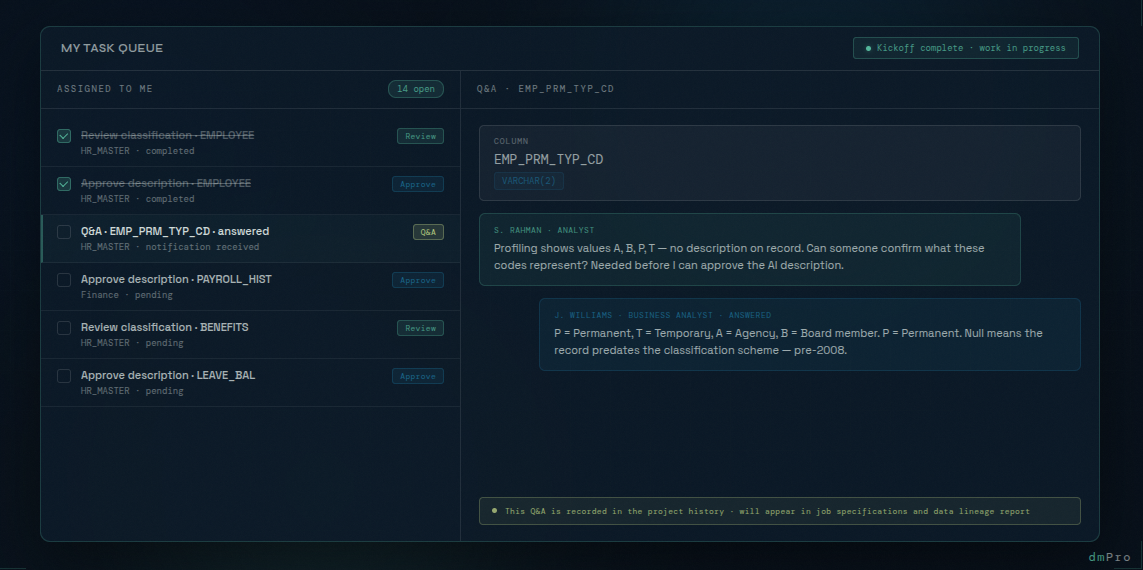
The work items or tasks have been assigned to individuals or to queues so that anyone assigned to the queue can grab the work and complete the task. Their first tasks are validation work: reviewing the AI's business area and classification assignments for the tables and columns in their area, and reviewing the AI-generated descriptions. These aren't rubber-stamp exercises — the AI gets things right most of the time, but it flags the ambiguous ones, and those need real analyst judgment. The review workflow is built into dmPro: accept the suggestion, edit it, or reject it. Every decision is recorded.
This is the work the team would normally get to in week three, after the spreadsheet was built and populated. They're doing it in week one, because the infrastructure is already in place.
One of the analysts around the table raises his hand. "So how many meetings are we going to need to schedule to get through all of this?"
It's a reasonable question. On a traditional project, progress depends on scheduled meetings — status calls to gather updates, working sessions to align on decisions, reviews to walk through the latest version of the spreadsheet. Everyone's calendar fills up fast, and the actual work happens in the gaps between meetings, if there are any.
"Fewer than you're used to," the lead says. "Most of this work doesn't need a meeting. It needs a task queue."
She explains how it works. When she assigns dmPro work items to an analyst or a queue, dmPro generates the relevant tasks and puts them directly in that analyst's queue — review this classification, approve this description, validate this assignment. The analyst works through their queue on their own schedule. Progress is visible to the lead in real time through the dmPro dashboards, without anyone having to send a status update or join a call. When a task is done, it's done.
When an analyst runs into something they can't resolve on their own — an ambiguous column, an unexpected value distribution, a business rule they don't have context for — dmPro has a built-in Q&A feature for exactly that situation. The analyst creates a question directly against the table they're working on, and dmPro automatically routes it to the appropriate person or queue based on the project configuration. There's no need to track down the right person, send an email, or wait for the next meeting. When the question is answered, the analyst gets a notification and can pick up exactly where they left off. The question, the answer, and the context around it become part of the project's permanent data history — showing up in the migration job specifications and in the data lineage report, so that every decision is traceable long after the project is over.
"The rhythm isn't weekly status meetings," she says. "It's milestone reviews. When the description and classification tasks are done, we'll do a quick check-in."
Another analyst leans forward. "And then we'll map everything, right?"
"No," the lead says. "That's the way we used to do things — and we always skipped an important step because of it. At this point we know some tables and columns that don't need to be migrated, but we don't know yet which ones do. There are likely more that don't. Before we touch mapping, the team needs to determine the requirements: which tables and columns should be migrated, of those which columns should have data quality rules defined, which columns should require migration tests, and which columns must be included in UAT testing. Once we know our requirements, then we begin mapping. Not before."
She continues. "When the requirements tasks are done, that's the next check-in. Then I'll trigger the mapping generation, and those recommendations will land in your task queue just like everything else — review them, approve them, edit them or push back on the ones that don't look right. If you hit something you need help with, you've got options: set up a quick call with the right people, raise a Q&A in dmPro, or assign a task to someone directly. Either way, the work keeps moving. In between milestones, you work your queue and I watch the dashboards. If something needs me, flag it in dmPro and I'll pick it up."
What Comes After
Once the business area, classification, and description tasks are complete, the team moves into requirements determination — the step most projects skip. Each analyst works through their assigned tables and columns to answer four questions: does this need to be migrated, does it need data quality rules, does it require migration testing, and does it need to be included in UAT? These decisions are captured as structured requirements in dmPro, business area by business area, and they drive everything that follows.
Only after requirements are confirmed does the lead trigger the AI mapping generation. The AI uses everything it knows about each column — the description, the profiling data, the business area, the classification, the HHS schema library — to suggest the most likely mapping to a Salesforce field. Those recommendations land in the task queue, just like everything else. The mapping work then proceeds business area by business area, starting with the Code and Reference Tables business area — the smallest, most structured, and easiest to validate. When that business area is complete, she triggers the next batch.
"We're not trying to do everything at once," she says. "We're working through it systematically, one business area at a time, so nothing gets missed and nothing gets rushed."
Why the First Week Matters
The data migration workstream enters most programs already behind. The development team has been building for months. The infrastructure team has provisioned environments. The project has momentum everywhere except in the migration lane, which is still standing up its spreadsheets.
When the migration lead can walk into the kickoff meeting and say "here's what's already done, here's what you're working on today" — that changes the dynamic entirely. The team doesn't start the project anxious about catching up. The steering committee doesn't mark the migration workstream as a risk on day one. The lead has demonstrated, before a single day of team work has happened, that this migration is going to run differently.
The goal isn't to impress anyone in the kickoff meeting. The goal is to make sure that when the team walks out of that conference room, they go straight to work — real migration work, not setup work. The first week sets the tone for everything that follows. There's no reason it has to be the slowest one.