After a data migration goes live, a question inevitably follows — especially in regulated industries: "Can you prove where this data came from?"
Not just which source system it came from. The full picture. What the original data looked like. What decisions were made about how to map it. What data quality rules were applied. What cleansing was performed. What transformation logic was used. Who approved the mapping. What tests were run and what the results were. What the UAT outcomes were. Who changed what, and when.
That's data lineage. And in heavily regulated environments — healthcare, finance, government, insurance — it's not optional. It's a compliance requirement.
Why Data Lineage Matters
Data lineage traces the complete journey of a data element from its origin through every transformation, decision, and quality check to its final destination. In the context of a data migration, this means documenting the end-to-end chain of custody for every record that moves from the legacy system to the target.
The regulatory landscape makes this non-negotiable for many organizations:
- GDPR requires organizations to demonstrate how personal data is processed, where it flows, and what controls are in place — including the ability to trace data back to its source when a subject access request arrives.
- HIPAA mandates audit trails showing how protected health information is accessed, modified, and transferred between systems. A migration that can't demonstrate this chain of custody creates immediate compliance exposure.
- SOX (Sarbanes-Oxley) requires publicly traded companies to prove the integrity of financial data. Auditors need to trace financial records from legacy to target with full documentation of every transformation applied.
- CCPA requires data mapping — knowing what personal information you hold, where it came from, and where it goes. A migration without lineage documentation makes this nearly impossible to satisfy.
- Government mandates at the federal and state level increasingly require data governance documentation for system modernization projects, particularly those handling citizen data.
Even outside strict regulatory requirements, data lineage serves a practical purpose. When something looks wrong in the target system — a value that doesn't match expectations, a record that seems incomplete, a calculation that's off — lineage documentation is how you trace the problem back to its origin. Without it, troubleshooting becomes guesswork.
The Spreadsheet Lineage Problem
Now consider how data lineage is typically documented on migration projects managed in spreadsheets. The short answer: it usually isn't. Not completely, and not accurately.
In theory, you could piece together a lineage trail from your mapping spreadsheets, your data quality tracking sheets, your test result files, your job execution logs, and your UAT sign-off documents. In practice, this means cross-referencing dozens of files, reconciling version conflicts, and manually assembling a narrative that connects source data to target data through every intermediate step.
When your migration documentation lives in spreadsheets, producing a data lineage report is a weeks-long effort — and the result is never complete, never fully accurate, and out of date the moment it's finished.
I've seen teams spend weeks attempting to compile lineage documentation after a migration, only to produce something that auditors still had questions about. The information existed — scattered across SharePoint folders, email threads, and individual team members' local copies of spreadsheets. But it wasn't connected. There was no single thread you could pull to trace a data element from legacy source through every decision, transformation, and test to its final state in the target system.
And the audit trail? Who changed what and when? Spreadsheets don't track that. At best, you have a "last modified" date on the file. Who specifically changed the mapping for column 847 of 3,000? When did they change it? What was the previous value? Good luck.
dmPro's Data Lineage Report
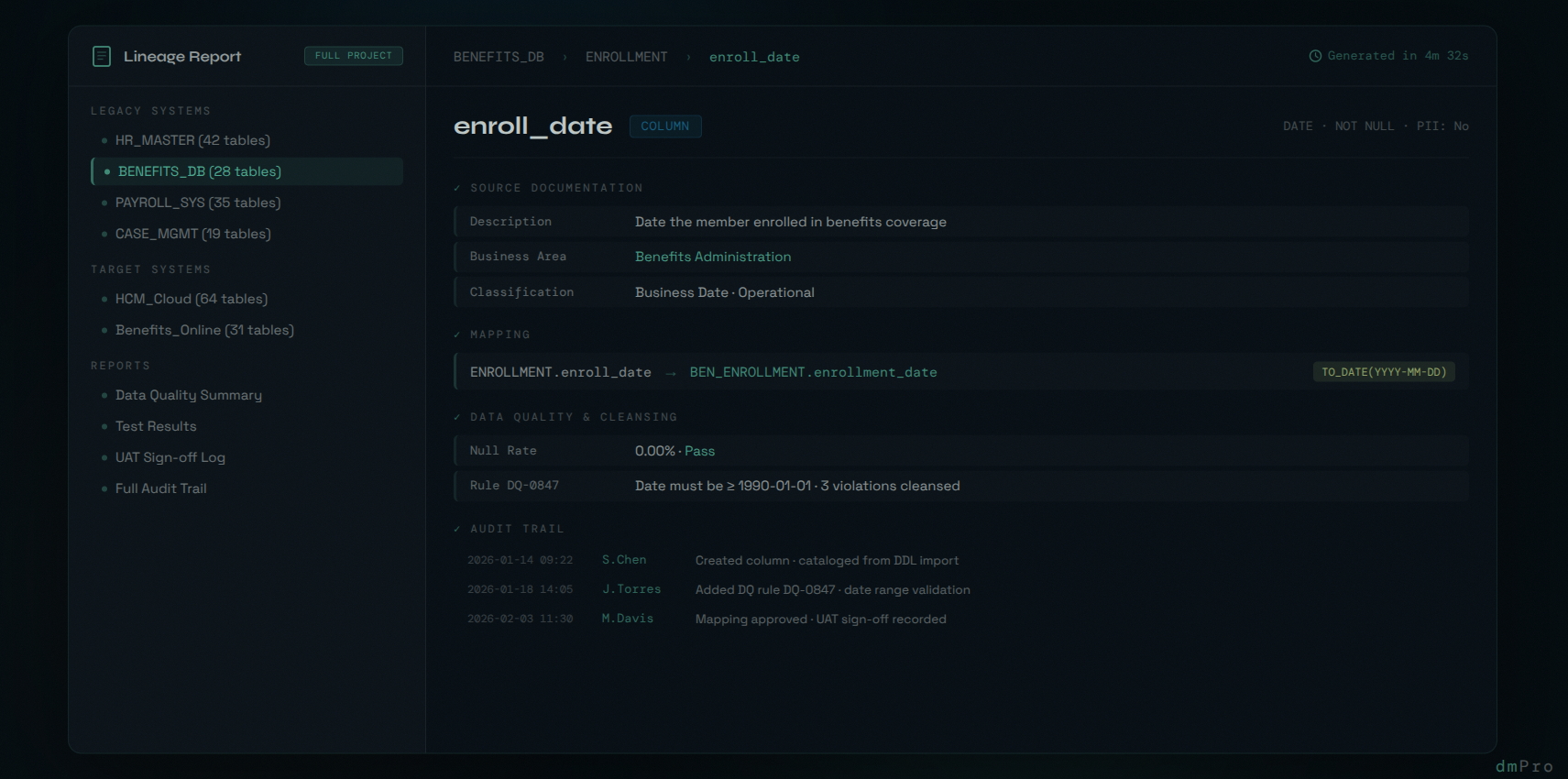
dmPro generates a complete, project-wide data lineage report with the click of a button. In under 5 minutes, you have a comprehensive document covering every entity in your migration project.
The report is generated in an HTML/wiki-style format — interactive, navigable, and designed for human reviewers and auditors. You can jump directly to any section, drill down from project-level summaries to the lowest level of detail about any individual table or column, and trace the complete lineage of any data element through every stage of the migration.
What the Report Covers
For every table and column in the project:
- Source documentation: Complete details of the legacy data element — table, column, data type, description, classification, business area assignment.
- Data quality: Every data quality rule defined for that element, the profiling results, and any cleansing actions taken. What was found, what was done about it, and by whom.
- Mapping decisions: The complete source-to-target mapping with transformation rules, exception handling, and business logic. Not just what was mapped, but the rules governing how it was transformed.
- Migration testing: Test definitions, test execution results, pass/fail outcomes, and defect resolution. The evidence that the migration was validated before going live.
- Migration jobs: Job specifications, execution history, record counts, and error logs. The operational record of how the data was actually moved.
- UAT sign-off: User acceptance testing results and approvals. The formal record that business stakeholders validated the migrated data.
- Audit trail: Who changed what and when — across the project. Rule changes, status updates, classification changes, description edits — timestamped and attributed to a specific user.
Why This Changes the Conversation
Consider the difference in two scenarios.
Scenario 1: An auditor asks to see the lineage for customer financial data that was migrated six months ago. Your team starts pulling spreadsheets from SharePoint, cross-referencing mapping files with test results, trying to reconstruct who made which decisions. Two weeks later, you have a partial answer with gaps.
Scenario 2: The same auditor asks the same question. You click a button, wait a few minutes, and hand them an interactive report where they can navigate directly to any financial data element and see the complete chain — source, quality rules, cleansing, mapping, transformation, testing, job execution, UAT approval, and every change made along the way with who made it and when.
That's not just a time savings. It's a fundamentally different compliance posture. You're not scrambling to prove lineage after the fact — you're generating it directly from the structured data that was captured during the migration itself.
Built-In, Not Bolted On
The reason dmPro can generate this report in minutes is that lineage documentation isn't a separate activity. It's a byproduct of doing the migration work itself.
When your team catalogs legacy data in dmPro, that's documented. When they define data quality rules, that's documented. When they create a mapping and specify transformation logic, that's documented. When tests run and produce results, that's documented. When a migration job executes, that's documented. When a stakeholder signs off on UAT, that's documented.
Every action, every decision, every change — captured automatically as part of the normal workflow. The lineage report simply assembles what's already there into a comprehensive, navigable document.
For organizations in regulated industries — or any organization that needs to demonstrate the integrity of their migrated data — this isn't a nice-to-have feature. It's the difference between being audit-ready and spending weeks trying to reconstruct a story that may never be complete.
Data lineage shouldn't require a separate project to produce. It should be a button click.