In a previous post, we looked at how dmPro uses AI to generate column descriptions for legacy systems. We covered the three inputs the AI draws on — column metadata and profiling results, a library of over 20,000 industry-standard entities, and uploaded system documentation. And we ended with a note that descriptions aren't just documentation: they're the direct input into the next critical step.
That step is mapping.
Deciding which source column maps to which target column is one of the most time-consuming phases of a data migration project. It's also one of the highest-risk phases, because mapping errors compound. A wrong source-to-target pair leads to a flawed job specification, which leads to an ETL developer building the wrong thing, which surfaces as data quality failures in testing and rework that touches multiple layers of work.
The traditional approach is manual and extremely time consuming: the data migration team gathers around a conference room table (usually 10-15 people), multiple times a week (as many as can be fit into everyone's schedule), for 2 to 4 hours per meeting. All of these people are needed because the knowledge is spread out among multiple people and only certain people have the authority to approve the mappings. In these meetings the entire team goes through the spreadsheet line by line, figuring out what data a column contains, if it's actually needed in the new system, and determining where it goes. If the team manages to complete a legacy table or two per meeting it is deemed a success. Only a few hundred more tables to go!
dmPro's AI mapping suggestion feature is designed to change that equation.
How AI Mapping Suggestions Work
After the legacy cataloging phase is complete — descriptions generated, profiling imported, classifications and business areas assigned — you can ask dmPro's AI to propose source-to-target column mappings. You select a legacy data source and one or more tables. The AI processes each table in turn and returns a set of proposed column pairs.
The key to understanding why this works is recognizing that the AI isn't starting from scratch. It already has substantial context about every column it's working with — context that was built up during the description and classification phases.
For each legacy column, the AI has:
- The description, whether AI generated or not, which captures the business meaning of the column in plain language
- Data profiling results — value distributions, null rates, pattern frequencies, unique counts
- The column's classification (sensitive data type, if applicable)
- The column's business area assignment
- Relevant passages from uploaded system documentation
For each target column, it has the same categories of information, plus the load order defined in the target catalog.
The AI uses all of this context — not just column names — to propose which source columns most likely correspond to which target columns, and what transformation logic may be needed to bridge the two.
How Suggestions Are Presented
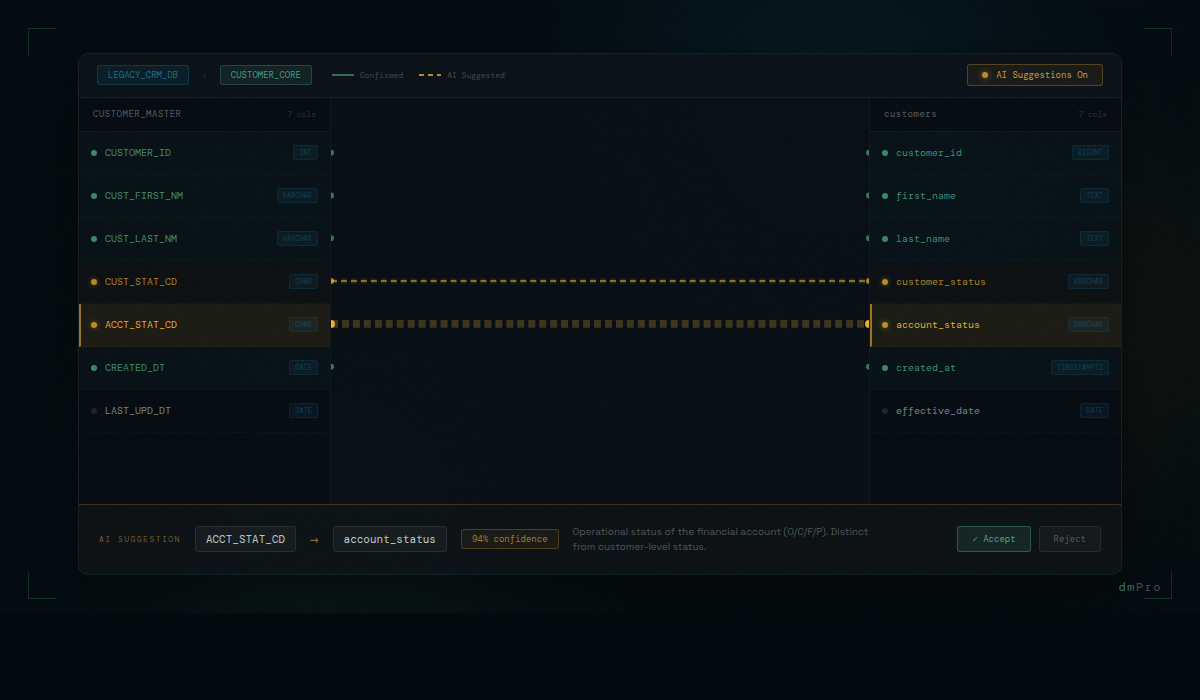
AI mapping suggestions appear in the mapping pane as blue lines — visually distinct from confirmed mappings, which are displayed as green lines. At a glance, you can see which mappings are proposed and which are confirmed. The visual distinction is intentional: proposed is not approved.
Review happens in two ways. In the Recommendations view, you can review each proposed pair in sequence — source column, proposed target column, the AI's confidence context — and accept or reject. In the mapping pane itself, you can click on a blue line to approve or reject it directly on the diagram.
Accepting a suggestion converts it to a confirmed mapping. It moves into the same workflow as any manually-created mapping — it can have transformation rules added, exceptions defined, and it flows into the auto-generated job specification.
Rejecting a suggestion marks the pair as permanently excluded. It won't be proposed again on future runs for that table, even if the AI would otherwise suggest it. This is important: it means the team's review decisions teach the system about what doesn't apply to this project, and future AI passes on the same source don't repeat the same incorrect proposals.
Columns That Don't Match
Not every legacy column has an obvious target counterpart. Columns that the AI cannot map with confidence are flagged for human review — the AI surfaces them explicitly rather than omitting them or guessing badly. These are the columns that genuinely require analyst judgment: fields that are unique to the legacy system, fields with ambiguous business meaning even after description generation, fields that may have split across multiple target columns or merged from multiple source columns.
The AI handling the obvious matches means analyst time is directed to the work that actually requires it. Reviewing a confident AI suggestion — checking whether the proposed pair makes sense, accepting it, and moving on — takes seconds. Working through a genuinely ambiguous column — understanding the legacy context, identifying the correct target, defining the transformation — takes minutes. When the volume is hundreds or thousands of columns, the difference between spending analyst time on all of them versus only the ambiguous ones is measured in days.
What Makes the Suggestions Accurate
The quality of AI mapping suggestions is directly proportional to the quality of the context they're built on. This is why description generation comes first.
A mapping suggestion built on a well-described source column — with profiling that confirms the expected value patterns, matched to an industry-standard entity with an authoritative definition, and grounded in relevant system documentation — is qualitatively different from a guess based on column name similarity. The AI has evidence. It's not inferring from syntax; it's reasoning from meaning.
Consider two columns that might superficially look like candidates for the same target: CUST_STAT_CD and ACCT_STAT_CD. Their names are similar. But if the description for CUST_STAT_CD says "Indicates whether the customer record is active, suspended, or archived — populated for all customer records" and the description for ACCT_STAT_CD says "Indicates the operational status of the financial account, not the customer — codes are O (open), C (closed), F (frozen), P (pending)" — those are clearly different things. A column-name-based matching algorithm might conflate them. An AI working from descriptions won't.
The quality of AI mapping suggestions is directly proportional to the quality of the context they're built on. This is why description generation comes first — and why accurate descriptions are the foundation of a reliable mapping phase.
The Risk Reduction Argument
It's worth being direct about why mapping quality matters as a risk factor, because the mapping phase can feel like a documentation exercise rather than a risk management activity.
On most data migration projects, mapping errors are one of the largest sources of rework. Issues found during testing because the source-to-target pair was wrong — or the transformation logic was ambiguous — are expensive to fix. The mapping has to be corrected, the job specification updated, the ETL job modified, and the affected data reloaded and retested. On a large project with complex interdependencies, a mapping error discovered in UAT can take days to fully resolve.
Issues that make it to production are worse. They surface as data inconsistencies that real users encounter in a live system, at the point when fixing them is most disruptive and most expensive.
Reducing mapping errors at the source — before the spec is written, before ETL development begins — is where the real risk reduction happens. AI-assisted mapping, built on accurate contextual descriptions, produces fewer errors than manual mapping under time pressure. And the human review workflow means a second pair of eyes is on every accepted suggestion. The combination systematically reduces the rate of downstream mapping-related problems.
When Mappings Change After Jobs Are Built
Mappings don't stay static. On any project of meaningful size, requirements evolve. A source column that was thought to be straightforward turns out to have edge cases that change the transformation rule. A business rule shifts based on a UAT finding. A target field is redefined by the receiving system's team.
In a spreadsheet environment, this is one of the most error-prone moments in a migration project. A mapping is updated. The analyst knows about it. The person who built the job spec may or may not be notified. The ETL developer may or may not hear about it through the right channels. In a project with dozens of migration jobs and multiple people working simultaneously, changes have a way of not making it everywhere they need to go.
dmPro tracks the relationship between mappings and the jobs that were built from them. When a mapping changes, the system can immediately identify every job affected by that change. The project team doesn't have to manually trace which jobs reference the changed column or rule. The change is recorded, the impact is computed, and the team works from the same up-to-date picture. Nothing falls through the cracks because someone forgot to forward an email.
That's what "reducing data migration risk" actually means in practice. Not abstract assurances — specific mechanisms that catch errors earlier, when they're still cheap to fix, and surface downstream impacts automatically when changes occur after the fact.